
Channel Box Attributes
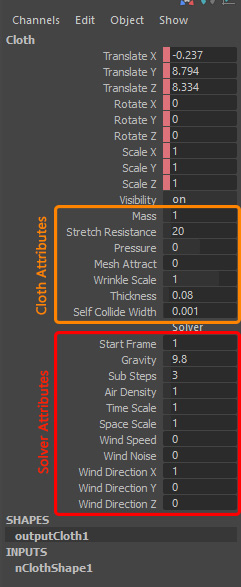
The first 7 attributes are for controlling your cloth behavior, these are unique to your object.
The next 11 attributes are Solver attributes, they are shared between all your dynamic objects, which means changing any of these attributes on one object will affect all other objects as well.
These are only a selection of attributes, brought to the channel box for your ease of access for more advanced control over your cloth behavior you can always check all the other nCloth attributes in the attribute editor.
Mass:
Determines the weight of the cloth. A cloth with a Mass of 0.0 would be fairly light (such as silk) and a cloth with a Mass of 1.0 would be fairly heavy, but you can set it to values higher than 1.
Stretch Resistance:
It specifies how much your object resists stretching when under tension.
A low stretch resistance makes your cloth stretch more, while a high stretch resistance makes your nCloth tight.
Mesh Attract:
It specifies how much the current cloth is following the original mesh.
If you have an animation for pressing the cloth against a surface, the cloth will not follow the animation until you set a value for MeshAttract.
Pressure:
Specifies a force applied along the surface normal direction of the current nCloth object when the Pressure Method is set to Manual.
Wrinkle Scale:
Sets the intensity of the wrinkle map.
To paint a wrinkle map, click on the dynamic button with a cloth object selected.
Thickness:
In most cases, it’s better if you use a single sheet for simulation and later extrude your mesh to add thickness.
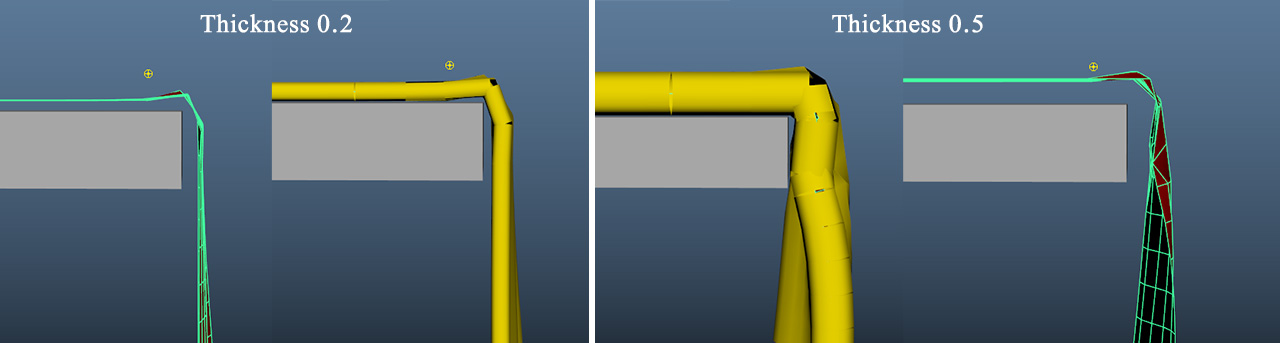
You can increase the thickness of your cloth To avoid overlapping between your cloth and any collider.
Increasing the thickness will also affect the self-Collide width.
Self-Collide Width:
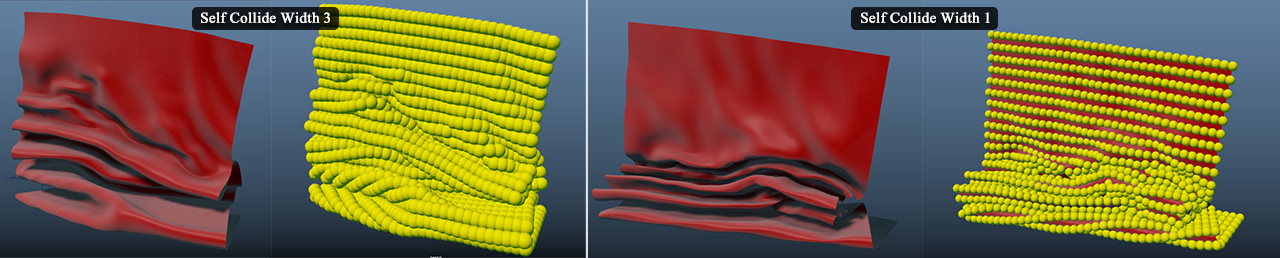
This parameter controls the distance at which the cloth collides itself. Smaller width results in smaller wrinkles.
Friction:
Determines how much the cloth resists relative motion on collision with other objects or itself.
You need to set a higher value if you want to do something like putting a tablecloth or a blanket over a bed, or else the cloth will just slide and fall.
Stickiness:
Cause the cloth to stick to collisions or itself.
Other attributes not listed in the channel box, but you may find them useful:
Compression Resistance:
Specifies the amount the current nCloth object resists compression. Compression resistance is the force applied to the current nCloth’s links when they are less than their rest lengths. A low compression resistance makes your nCloth crumple under pressure, like the crinoline, while a high compression resistance makes your nCloth resist crumpling. Having more compression than stretch keeps the structure of the current nCloth from becoming rigid, while at the same time keeping it from stretching. A Compression Resistance of 0.0 makes the current nCloth’s links behave like rubber bands, rather than springs.