
Open Settings:
you can find UI settings by right-clicking on the + icon at the Top Bar and choosing “Set UI Size”
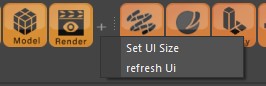
Set UI Size
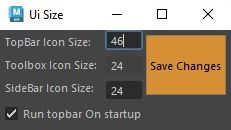
Topbar: you can change the size of the Topbar by changing the “Top Bar Icon Size” value and hitting the “Save Changes” button
Toolbox: currently not available
Sidebar: you can change the size of sidebar buttons by changing the “Sidebar Icon Size” value, after saving the changes the sidebar won’t get updated automatically as it had a history of crashing Maya during my tests. So first make sure to save your file and then use the “refresh UI” option to refresh all Maya X UI or you can just restart Maya.
Run Topbar on startup: You can disable “Run Topbar on startup” if you don’t want the Topbar to startup automatically with Maya.
Refresh UI:
This option will restart all MayaX related UI, which includes: Topbar, Sidebar, Attribute Editor buttons.
You can use it if for any reason one of them like the Attribute Editor buttons didn’t show up or if you want to update the changes to them.
It is highly recommended that you save your work before using this button, as there is a chance of crashing.