
With Randomizer you can randomize the vertex color of selected objects.
Randomize Vertex color Section:
RGB: randomize RGB color of objects
Red: randomize only the red channel.
Blue: randomize only the Green channel.
Green: randomize only the Blue channel.
Alpha: randomize only the Alpha channel.
Gray: randomize in grayscale.
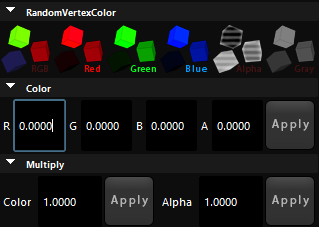
Color Section:
Here you can set a value to a channel for all your selected objects, for example, you used Randomize RGB to set different colors for your objects but now you want the Blue channel to be 1, you can set blue to 1 and hit apply and it will set that to all objects.
Multiply Section:
Here you can multiply color and alpha to a value, Let say you have randomized all colors but you need them to be darker, you can set the color to 0.5 and hit apply to a lower intensity of all colors by 0.5.
Randomizing vertex color is very useful and there are many cases where you can benefit from this tool.