


Create
Access all primitives and creation tools.
Clicking on it won’t do anything at the moment, in future versions, it will open create window.
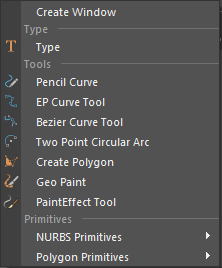
Right-click to access all the creation tools:
Create Window: still in production! So this won’t do anything in the current version.
Type: Create 3D text
Tools: This part contains all the basic tools that you can use in modeling.
Primitives: create Poly and NURBS primitives, unlike toolbox primitives you make here are not using the smart code, they have the default behavior of primitives.

Sculpt
Right-click to Access all sculpting brushes.

Modify
you can find all commands for modifying components here, it’s very similar to items you can find in the “Edit Mesh” menu.

Curve
all the curve operations – similar to the “Curves” menu.
New: you can also find “Auto Wire” commands here.

Mesh Tools
same items as the Mesh Tools menu.

Deformer
access all deformer commands, similar to Deform Menu.

Normal
Commands for modifying the normal of your mesh.
New: you can also find “Transfer Normal” commands here.
Transfer normal uses attribute transfer to transfer the normal of one object to another.
To use it, select the object you want to copy normal from first and then the object you want to apply normally to.

Topology
all the common commands for re-topology or modifying the topology of mesh in general.
New: you can also find “Planar Retopo” commands here.
Planar Retopo is a one-click retopo tool, that uses your object’s UV to do a quick retopology for your mesh

UV
Similar to UV Menu
New: you can also find “Rail UV” here.
rail UV can create flat UVs for objects such as tubes, roads,….

Dynamic
Create different types of dynamic effects with a single button
Dynamic button’s Behavior changes based on your selection.
You can use the dynamic button to make:
Vertex Color
here you can find all commands related to vertex color.
New: you can also find “Randomizer” here.
With Randomizer you can randomize the vertex color of selected objects
 Convert
here you can find all commands from Modify>Convert.