
Paint maps
To paint a detail map, you should Assign a new map to “incandescence”
MAKE SURE TO SAVE THE SCENE (MAYA won’t save textures if you don’t save your scene)
Press the  button to use incandescence map as detail map.
Note: currently at this version you should either use detail map handles or paint it on your mesh, you can’t use both. Which means if you already have a detail map using the detail handles, as soon as you press this button it will connect the incandescence map to the detail map and disconnect your previous map.
After that, assign a custom map or assign paint effect presets to your brush and start painting your map. I recommend switching to shading mode to only see the mesh and not the texture.
If you can’t see the displacement, select the terrain surface and press alt+3.
You also have a new attribute “Detail Height” to control the height of detail map.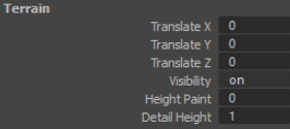
After you are done with painting you can disconnect this incandescence map from material.