
In the Baking window, you’ll find an “Add Attribute” button at the top. Clicking this button opens a dropdown menu where you can choose from the following attributes:
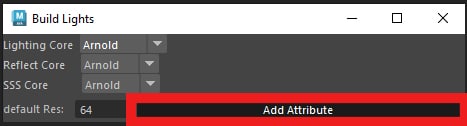
-
Lock Build: This attribute disables light baking, reflections, and SSS for the object in future light map bakes. You can modify this and other attributes later in the Channel Box.
Lock Light Map Build: This attribute will disable only the light baking for the selected object in future bakes.
Lock Reflection Bake: This attribute will disable only the reflection baking for the selected object in future bakes.
Lock SSS Build: This attribute will disable only the Subsurface Scattering (SSS) baking for the selected object in future bakes.
Light Map Resolution: By adding this attribute, you can adjust the light map resolution of the selected object in the Channel Box.
Reflection Resolution: This attribute allows you to change the reflection resolution of the selected object in the Channel Box.
SSS Resolution: With this attribute, you can adjust the Subsurface Scattering resolution of the selected object in the Channel Box.
Animated SSS: Use this option if you want to bake animated SSS map for this object.
Animated Reflection: Use this option if you want to bake animated reflections for this object.
Auto-Move Reflection: You can use it to toggle the “auto move reflection actor”, by default when you hit bake, the reflection actor will be placed in the center of the object based on the auto move checkbox in the X-Ray window, by using this attribute you can set it per object, so for example you can have auto move enabled by default but disabling it for some specific objects in the scene.
Shared Reflection: You can add this attribute to a Reflection Actor and Instead of baking reflections for every object separately, it will bake reflections once and share it across any object that uses this actor.
-